
How to Write AI Video Prompts: A Practical Formula
A practical AI video prompt formula for text-to-video and image-to-video, with an annotated example, failure diagnosis, and a credit-aware iteration loop.
Publié le 29 juil. 20266 min de lecture
Start with the input, not a universal template
The most useful AI video prompt formula changes with the material you already have.
- Text-to-video: the prompt must describe the whole shot—subject, action, place, framing, camera, light, and timing.
- Image-to-video: the image already carries the subject, composition, light, and style. The prompt should mainly describe what moves.
That distinction prevents a common mistake: writing a long text-to-video description on top of a finished image, then giving the model several competing versions of the same scene.
This guide gives you one formula for each workflow, a complete example, and a practical way to diagnose a prompt without rewriting everything at once. It is a model-agnostic editorial framework, not a benchmark or a promise that one syntax works identically everywhere.
If you need the broader production workflow—shot intent, cinematic lighting, category choice, and continuity planning—start with How to Make Cinematic AI Video. This article stays narrower: choosing prompt anatomy from the input and diagnosing the first failed variable.
Formula 1: text-to-video as a seven-part shot brief
For a prompt-only generation, use:
Subject + Action + Setting + Shot + Camera movement + Light/style + Timing
You do not need a long sentence for every part. You need enough information to remove the decisions that matter.
| Part | Question to answer | Example |
|---|---|---|
| Subject | What must remain recognizable? | A lone cyclist in a mustard-yellow rain jacket |
| Action | What changes during this shot? | Rides steadily across the bridge |
| Setting | Where and when? | Blue hour after rain, wet road, light mist |
| Shot | What belongs in the frame? | Wide road-level three-quarter shot |
| Camera | How does the viewpoint change? | Tracks parallel at a steady distance |
| Light/style | What is physically visible? | Cool ambience, warm road reflections |
| Timing | How should motion unfold? | One controlled, continuous shot |
Google's current video-generation guidance recommends keeping short clips focused on one scene. If the idea contains “finds a clue, drives across town, then confronts a suspect,” split it into shots instead of forcing a plot into one prompt.
Use concrete visual choices rather than biography or mood labels. “Epic” is an interpretation; a wide low-angle shot, hard backlight, and a slow crane reveal are instructions. Likewise, choose one dominant camera behavior unless the sequence between movements is explicit.
A complete prompt, annotated
Here is the seven-part formula assembled into one prompt:
A lone cyclist in a mustard-yellow rain jacket rides steadily across an empty suspension bridge at blue hour after rain. Wide road-level three-quarter shot, with the cyclist on the left third and open road ahead. The camera tracks parallel at a steady distance. Wet asphalt reflects distant red and amber traffic lights; cool overcast ambience, light mist, restrained contemporary film color. One continuous shot with controlled speed and smooth tracking throughout.
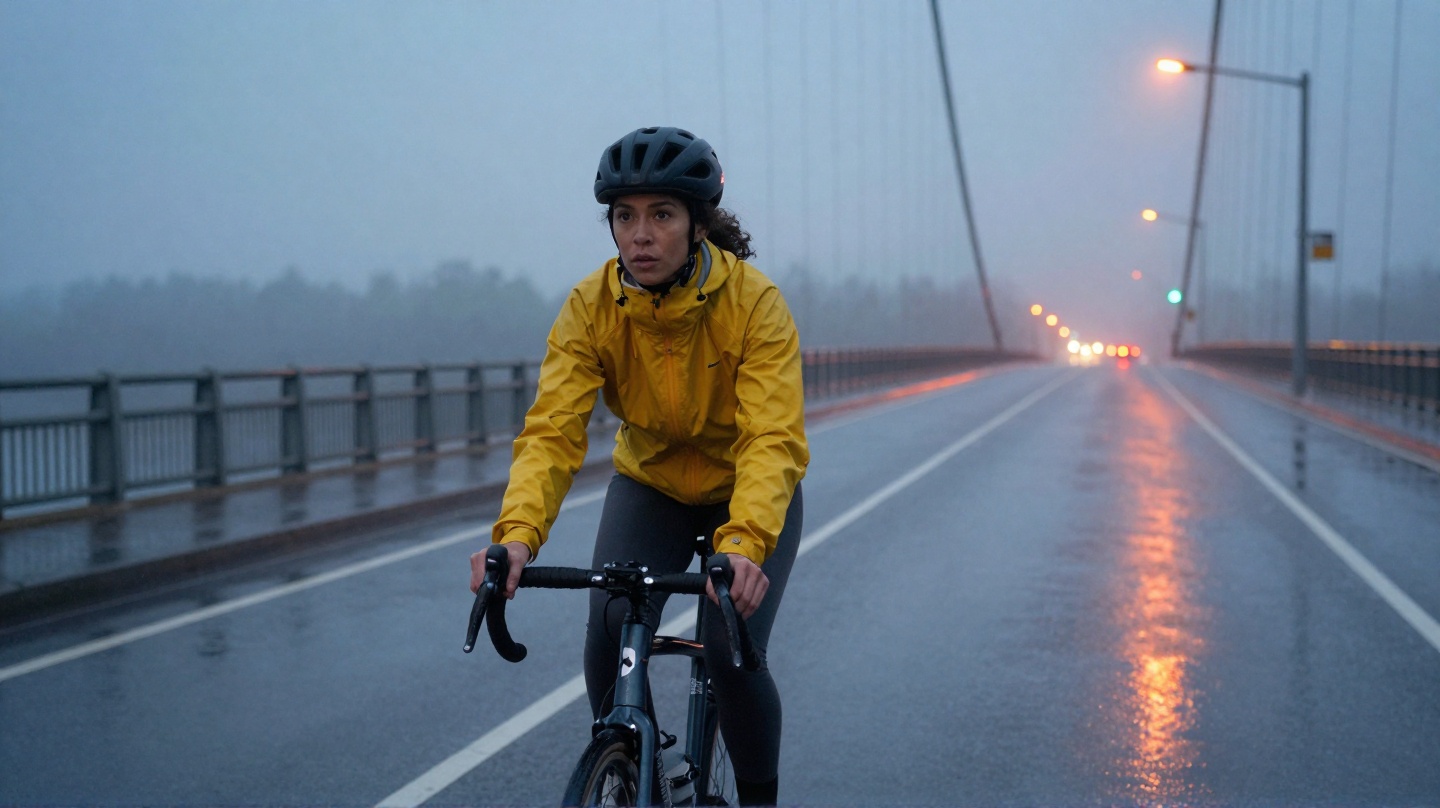
The image above is an editorial still created for this guide, not the output of a cross-model video test. It demonstrates how each phrase maps to a visible decision:
| Prompt part | Decision |
|---|---|
| Subject | One cyclist, yellow jacket |
| Action | Steady forward ride |
| Setting | Suspension bridge, blue hour, wet road, mist |
| Shot | Wide, road level, space ahead |
| Camera | Parallel tracking |
| Light/style | Cool ambience with warm reflections |
| Timing | One controlled, continuous shot |
The prompt is detailed because it resolves seven different decisions—not because more words automatically produce a better video.
Formula 2: image-to-video should describe motion
When you already have a first frame, use a shorter structure:
Camera motion + Subject motion + Environmental motion + Timing
Both Google and Runway advise treating the source image as the visual foundation. It already defines the subject, scene, composition, light, and style. Repeating all of those details in the motion prompt can introduce redundant or conflicting instructions.
For the cyclist still, an image-to-video prompt could be:
The camera tracks smoothly beside the cyclist. The cyclist pedals at a steady pace while the rain jacket moves lightly in the wind. Fine mist drifts across the bridge and road reflections shimmer subtly. Controlled motion, one continuous shot.
Notice what is missing: no second description of her face, jacket color, bridge architecture, or lighting setup. The image already supplies those facts.
This also changes how you refer to the subject. “The cyclist” is often enough; repeating a dense character description can encourage the model to reinterpret an identity that is already visible.
Diagnose the failure before rewriting the prompt
After a weak result, identify the smallest failed decision and revise that part first.
| What you observe | Likely prompt problem | First revision |
|---|---|---|
| The subject is generic | Subject lacks visible anchors | Add two or three defining details |
| Too much happens | Several events compete in one clip | Keep one primary action |
| Framing feels accidental | No shot size or viewpoint | Add one explicit shot instruction |
| Motion is confused | Camera and subject directions compete | Keep one camera move and one subject action |
| Image-to-video barely moves | Prompt repeats the still instead of animating it | Remove scene description; state motion |
| The mood is vague | Abstract adjectives carry the visual burden | Specify light, color, weather, or texture |
| You cannot tell what improved | Too many variables changed at once | Restore the prior prompt; change one component |
Runway's Gen-4 guide explicitly recommends starting with essential motion and adding one new element at a time. That is a useful debugging discipline beyond any single model: it gives each generation a question to answer.
Do not assume prompt syntax is portable
The visual grammar is reusable; model-specific syntax is not.
For example, Runway's Gen-4 documentation recommends positive phrasing and says negative phrasing is unsupported. Instead of “no camera movement,” it suggests describing the intended state: “locked camera; the camera remains still.” Another model may expose a dedicated negative-prompt field or interpret exclusions differently.
Use portable visual instructions in the main prompt:
- “locked camera” instead of a paragraph of camera prohibitions
- “one continuous shot” instead of assuming a universal no-cuts token
- “only the cyclist moves” instead of an unbounded negative list
Then check the selected model's current controls before relying on special syntax. Even official camera terminology can vary in reliability: Google's prompt guide says results may vary for some advanced camera angles, while Luma documents camera control through natural-language motion phrases and warns that similar wording can still mismatch.
A credit-aware iteration loop in OpenVideos
OpenVideos separates video creation into categories such as text-to-video, start-frame-video, and start-end-frame-video. Choose the category before polishing the prompt.
- Choose the input mode. No approved still means text-to-video. An approved first frame means start-frame-video. A planned opening and ending belongs to first/last-frame work.
- Write the minimum complete prompt. Resolve one shot, not an entire montage.
- Open Create and inspect the selected model. Model controls differ; do not assume every parameter or prompt convention is shared.
- Confirm the displayed credits before submitting. OpenVideos calculates the selected job's cost from its model and parameters; the article does not hard-code a universal price. Use
/pricingfor current credit-pack information. - Save the exact prompt and result. Without the original prompt, the next revision becomes guesswork.
- Name the largest mismatch. Subject, action, framing, camera, light, or timing?
- Change one component. Keep the rest stable so the next generation produces useful evidence.
Changing one component at a time helps isolate which instruction affected the next shot.
A compact checklist
For text-to-video:
- One recognizable subject
- One primary action
- A visible setting
- One framing decision
- One primary camera behavior
- Physical light/style details
- A clear pace or continuity instruction
For image-to-video:
- A strong source image
- Camera motion
- Subject motion
- Environmental motion
- Timing
- Little or no redundant scene description
For either workflow:
- One short scene, not a full plot
- No unsupported model claims
- One-variable revisions
- Credits confirmed in Create before submit
Sources and limits
This framework synthesizes current first-party guidance from Google Cloud's video prompt guide, Google's video-generation best practices, Runway's Gen-4 prompting guide, and Luma's video generation documentation.
It does not rank models or claim that the example prompt produces identical results across them. Those conclusions require the same input, prompt, settings, logged credits, retries, and outputs across a controlled benchmark.
If you want to apply the formula now, open text-to-video for a prompt-only shot or image-to-video when you already have a first frame. For the broader cinematic workflow, read How to Make Cinematic AI Video. Confirm the current credit cost in Create before generating.
Related posts
Guide
AI Video Credits Explained: Signup Bonus, Packs, and Real Job Costs
OpenVideos uses credit lots with fixed expiry, not open-ended generation volume. See the 50-credit signup bonus, pack prices, FIFO spend, and registry example costs for image and video jobs.